


Music player
recorder & smart apps
I spent time using Music player as an everyday Android audio app, moving between quick listening, local file management, and small editing jobs. It is a straightforward Music & Audio app from recorder & smart apps, aimed at people who already keep MP3 files or other music on their phone and want a practical way to play them. The appeal is not a streaming catalog or a social discovery system. It is the convenience of having playback, tag editing, and audio cutting together in one place.
That focus makes it easy to understand. I can open my stored tracks, choose an album or artist, and start listening without building a new library inside a streaming service. The app is free to install, rated for Everyone, and supports devices running Android 5.0 or later. Its current version is 235.01, so it is clearly a mature product rather than a brand-new experiment.
My overall impression is positive, especially for listeners who want control over files they already own. I would not choose it as a replacement for a streaming subscription, a serious desktop audio editor, or a carefully designed audiophile player. But for a phone-based music collection, it offers a useful balance of simplicity and hands-on tools. Its strongest quality is the way it turns ordinary local tracks into something manageable without making the user learn a complicated audio workflow.
How the current app feels in everyday use
The first thing I noticed is that the app stays close to the basic job: play music stored on the device. That sounds modest, but it matters when a phone contains downloaded albums, recordings, transferred MP3 files, or tracks received from another device. Instead of treating every file as an isolated item in a file manager, the player gives the collection a more familiar music-library shape.
I found that approach particularly useful when I wanted to listen without relying on a data connection. A local player is also a better fit for personal recordings, older music that is not available on streaming services, and files copied from a computer. Music player does not ask me to change how I obtained or organized those tracks; it works around the collection I already have.
Related News

Instagram Is No Longer a Photo App. It Is an Attention Engine

Microsoft Teams Mobile: When Collaboration Becomes Navigation

How the NFL App Adapts to Android and iOS Updates

Temu: Elevate Your Shopping Experience to Billionaire Status

Why Traffic Rider Works Best as a Precision Reflex Game

How Google’s Find Hub Transforms Everyday Searches
The playback side is intentionally approachable. Someone who only wants to select a song and listen should not need to understand audio formats, tagging conventions, or editing terminology before getting started. At the same time, the app is more than a bare play button because it includes tools for changing tags and cutting audio. Those additions are what make it more interesting than the basic player that may come preinstalled on a phone.
Its popularity reflects that practical positioning. The app has a 4.7 average from around two million ratings and has passed 100 million installs. Those figures suggest that it has reached a broad audience, but they should not be mistaken for proof that it suits every listening style. A large audience can include casual listeners, file collectors, people replacing a missing player, and users who only need one small editing task.
What I like about the library approach
For me, the biggest benefit is reducing the number of separate apps involved in a simple workflow. I can listen to a track, notice that its information is untidy, and address that problem in the same general environment. If a song has an unhelpful title or incomplete artist information, better tags can make later browsing much less frustrating.
Gallery
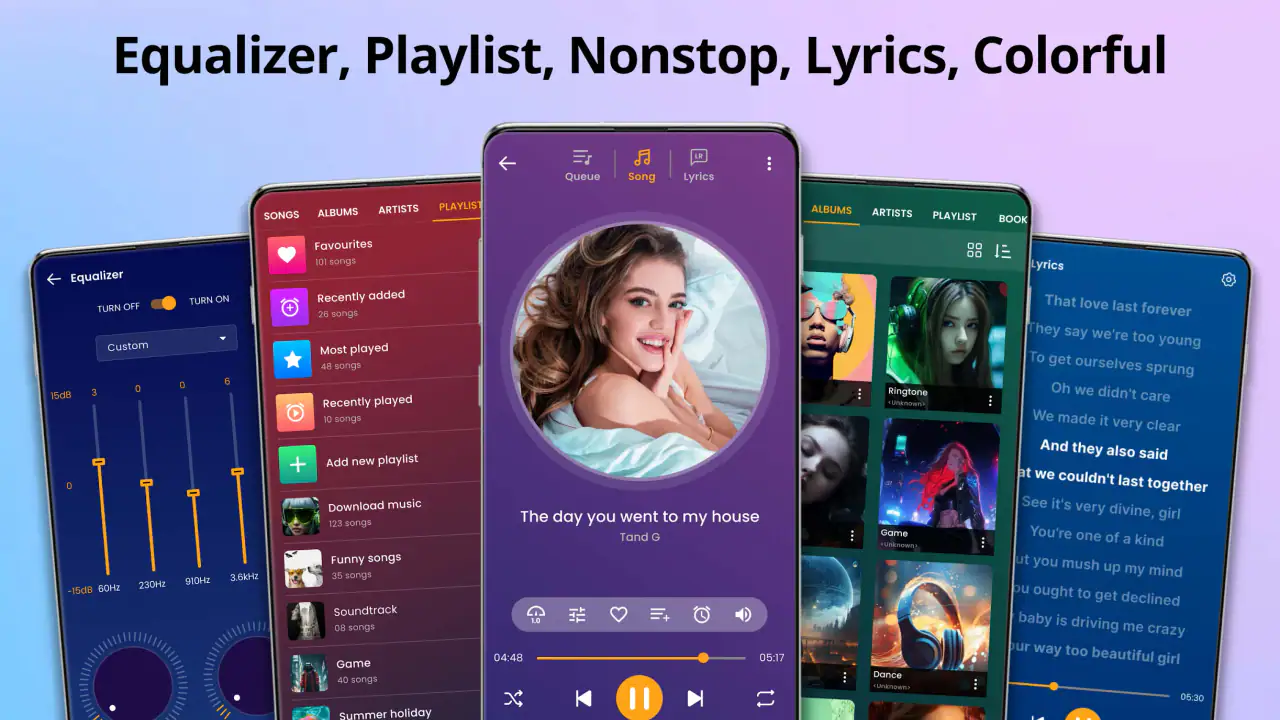
This is more important than it may sound. A local collection becomes difficult to use when filenames, album names, and artist labels are inconsistent. One file might use a track number at the beginning of its name, another might include extra text, and a third might have no useful identifying information at all. Tag editing gives the collection a chance to become organized around music details rather than arbitrary filenames.
The audio-cutting tool also has a practical role beyond making ringtones. I can imagine using it to remove a long silent opening from a personal recording, isolate a short excerpt for a presentation, or trim an unwanted ending from a file before sharing it. That is a different kind of value from playback: the app becomes a small utility for preparing audio, not just a listening window.
There is a trade-off, though. Combining these jobs can make an app feel busier than a minimal player. A person who wants nothing but a clean queue and a distraction-free interface may prefer a dedicated lightweight alternative. Music player makes more sense when the editing and organization tools are part of the reason for installing it.
A realistic day-to-day example
Imagine downloading several albums before a long trip and discovering that the files appear with inconsistent names. I would first use the player to check that the tracks are the correct versions, then tidy the most confusing tags so the collection is easier to browse. If one recording begins with several seconds of silence, I could cut that section rather than opening a separate editor. Afterward, I would return to normal listening without moving between multiple utilities.
That workflow is where the app feels most convincing. It does not try to solve every audio problem, but it removes small interruptions that otherwise accumulate. The value comes from the sequence: listen, identify a nuisance, make a focused correction, and continue. For people who maintain their own files, that is more useful than a polished streaming interface that cannot touch the local collection.
What the current version says about the product’s direction
The current version, 235.01, shows that this is an established app with ongoing version development. I treat that as a sign that the developer has continued maintaining the product, but I do not read the version number as a promise of a particular feature set or future redesign. The important point is that the app has evolved beyond a one-purpose player while retaining its local-music identity.
The product’s development path appears to be centered on practical additions rather than a complete change of category. Playback remains the foundation, while tag editing and audio cutting address common problems around personal files. That is a sensible direction because it strengthens the reason to keep the app installed: it is useful both before listening and during collection maintenance.
For existing users, this kind of evolution can be more valuable than a dramatic visual overhaul. A player that continues to handle familiar files while adding convenient tools is less disruptive than one that forces everyone into a new library model. I appreciate that the app’s purpose remains understandable even as its capabilities grow.
At the same time, a mature app can accumulate complexity. Newer users may see options they never need, while long-time users may have preferences about how tracks are sorted, edited, or displayed. The best way to approach it is to begin with the playback features, then bring the editing tools into the workflow only when a real problem appears. That keeps the experience from feeling like a project.
How it compares with the usual alternatives
Compared with streaming services, Music player offers a completely different relationship with music. Streaming apps are better when I want recommendations, large online catalogs, synchronized listening across devices, or effortless access to music I do not own locally. This app is better when the files are already on my phone and I want direct control without searching an online catalog.
Compared with a phone’s default music player, its advantage is the editing angle. A built-in player may be enough for casual playback, but it may not be the first tool I reach for when I need to correct a tag or shorten an audio file. Having those functions nearby makes this app more useful for personal collections that require occasional maintenance.
Compared with a dedicated audio editor, the app is more convenient for quick changes but less appropriate for detailed production work. I would not use a mobile music player as my main environment for multitrack composition, advanced restoration, or precise studio preparation. A specialized editor gives deeper control, while this app wins when the task is small and connected to ordinary listening.
Compared with a minimalist local player, the decision depends on priorities. If I care most about a very uncluttered playback experience, a simpler alternative may feel calmer. If I want one place for playback plus basic file cleanup, Music player has the stronger case. The choice is not about which app is universally better; it is about whether the extra tools justify the additional interface for my collection.
Where existing users may notice friction
The local-file focus is both the app’s identity and its main limitation. It does not replace the convenience of a streaming ecosystem. Anyone expecting online discovery, a subscription catalog, or an account-based music library should look elsewhere. Installing it will not transform locally stored files into a streaming service, and that distinction should be clear before making it the main player.
Organization can also require patience. Tag editing is helpful only when I am willing to make decisions about names, artists, albums, and track details. If a collection is very large, correcting everything manually could become tedious. I would recommend starting with the albums I listen to most instead of trying to perfect the entire library in one session.
Audio cutting is useful for focused trimming, but I would keep expectations realistic. A quick cutter is ideal for removing unwanted sections or creating a short excerpt; it is not automatically the right tool for delicate edits where exact timing, fades, or multi-layer work matter. For those jobs, a dedicated editor remains the safer choice.
There is also a practical reason to make a copy before changing important files. Any workflow that edits tags or audio should be approached carefully when the original recording matters. I would preserve the source file, make a test edit on a duplicate, and check the result before applying the same routine to a larger collection. That habit is useful because convenience should not come at the cost of losing a valuable recording.
The free price makes trying the app easy, although in-app purchases are listed at $5.99 per item. I would therefore explore the version as it appears on my device before deciding whether any optional purchase is worthwhile. The free entry point is appealing, but users who dislike optional paid elements inside an otherwise free app should pay attention during use rather than assuming every tool has the same access model.
Who should install it, and who should skip it
I would recommend it to someone with a personal MP3 collection, downloaded files, voice recordings, or music transferred from a computer. It is also a good fit for a user who wants occasional tag cleanup or quick audio trimming without installing a separate utility for every small job. People using an older compatible Android phone may appreciate that the app supports Android 5.0 and later.
I would be more cautious about recommending it to someone whose entire listening life is inside a streaming service. If playlists, recommendations, cloud synchronization, and online access matter more than local file control, a streaming app will probably feel more natural. The same applies to musicians and editors who need detailed production controls rather than a convenient listener-oriented cutter.
Parents and families may also find the Everyone content rating reassuring as a basic classification, but that label does not decide whether the app’s tools match a particular household workflow. I would still judge it by the files being handled and by who has access to the device. The rating describes the app’s general audience, not the quality or appropriateness of every audio file someone may store.
Practical ways to get more from it
My first tip is to treat tags as the foundation of the experience. Before making a large playlist or browsing repeatedly through filenames, fix the handful of tracks that are hardest to identify. Consistent artist and album information can make the rest of the library feel more coherent, and the improvement is often more noticeable than changing visual settings.
My second tip is to use audio cutting for clearly defined jobs. Decide in advance whether the goal is removing silence, shortening an ending, or extracting a small passage. Listening once before cutting and once afterward helps catch mistakes, especially when the source is a recording where a quiet moment may be intentional.
A third useful habit is separating listening files from working files. Keep originals in a safe folder and use copies when experimenting with edits. This is particularly sensible for irreplaceable recordings, lectures, interviews, or live performances. The app can make a quick change convenient, but a simple backup routine makes that convenience much safer.
I would also avoid trying to reorganize an entire collection while tired or in a hurry. A short session focused on one artist or album is easier to verify than a sweeping cleanup. Once the most-used material is tidy, the remaining files become less urgent, and the app returns to its primary role as a player instead of becoming a permanent maintenance task.
Finally, I would test the app with the types of files I actually use. A player can feel excellent with a clean collection and less satisfying with unusual naming, incomplete metadata, or recordings that need careful editing. A short trial using several representative tracks gives a more honest answer than judging it from one perfectly organized album.
My recommendation after living with it
Music player succeeds because it understands a common Android need: many people still have audio files of their own, and those files need more than a generic file browser. The app combines listening with two practical forms of maintenance, making it easier to correct messy information and trim audio without turning every small task into a separate project.
I like its clear purpose, its accessible starting point, and the way the tools support a real local-library workflow. The developer, recorder & smart apps, has built a product that feels aimed at ordinary phone use rather than professional studio work. Its broad adoption and strong average rating reinforce the impression that this approach works for many listeners, though personal preferences about interface simplicity and online features still matter.
The limitations are equally clear. It is not the right choice for streaming discovery, serious audio production, or users who want the smallest possible playback-only app. Editing a large library may take effort, and important files deserve backups before changes. Those are not reasons to dismiss it; they are boundaries that help define where the app is most useful.
For my own recommendation, I would suggest trying it if your phone contains music you have collected yourself and you want playback plus quick file care in one place. Start with a few albums, correct only the tags that cause trouble, and use copies when trimming audio. If that workflow feels natural, the app becomes a dependable local music companion rather than just another player sitting on the phone.
Looking ahead, I would watch how future versions balance added convenience with the straightforward experience that makes the app approachable. Continued attention to local playback, sensible organization, and safe editing would strengthen its current identity. I would not want it to chase streaming services or professional editors at the expense of the simple, useful role it already fills.
In short, this is a free Music & Audio app with a practical reason to exist. It gives local listeners a comfortable place to play their collection and handle small audio jobs, while leaving online catalogs and advanced production to more specialized alternatives. For the right user, that focused combination is exactly what makes it worth installing.
FAQs for Music player
What audio formats does the music player support?
The music player supports a wide range of audio formats, including MP3, WAV, AAC, FLAC, and more. This ensures that users can play virtually any audio file without needing to convert them. Compatibility with these formats allows for a seamless listening experience across different devices and audio collections.
Can I create and manage playlists within the app?
Yes, the app offers robust playlist management features. Users can easily create, edit, and delete playlists to organize their music according to different moods, genres, or occasions. This feature enhances user experience by allowing personalized music curation and easy access to favorite tracks.
Does the app offer offline playback?
The music player supports offline playback, which means users can download their favorite tracks and listen to them without an internet connection. This is particularly useful for users who travel frequently or have limited data plans, ensuring uninterrupted music enjoyment on the go.
Is there an equalizer or sound customization feature?
Yes, the app includes an equalizer with various presets and customizable settings. Users can adjust bass, treble, and other sound parameters to suit their preferences. This feature ensures that users can tailor the audio output to their liking, enhancing the overall listening experience.
How does the app handle music library organization?
The app automatically organizes your music library by artist, album, genre, and more. It also allows users to manually tag and sort tracks for further customization. This organization makes it easy to find specific songs and maintain a well-organized music collection, improving navigation and user satisfaction.
Pros
- Intuitive interface for easy navigation.
- Supports a wide range of audio formats.
- Customizable equalizer settings.
- Offline playback available.
- Creates smart playlists automatically.
Cons
- Contains ads in the free version.
- Limited cloud integration options.
- Some features require premium subscription.
- Occasional app crashes reported.
- No built-in lyrics support.


